This page outlines the options available in the SC700 series of modules and backplanes for the 80-pin RCBus. This range uses the full 80-pin RCBus for maximum functionality and future proofing.
The SC700 series includes products designed to meet the requirements of the RCBus v1.0 specification.
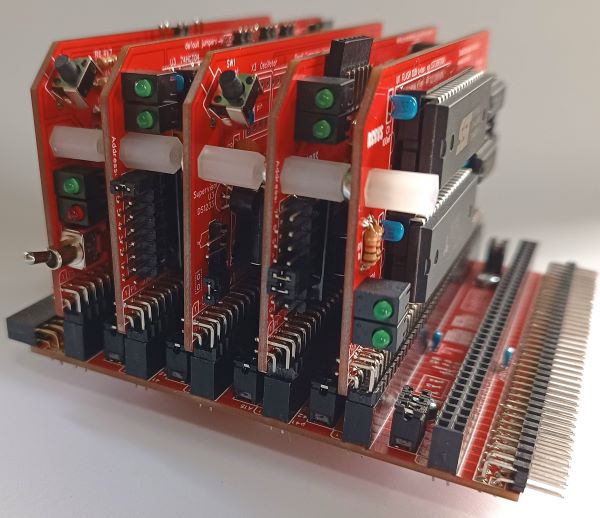
The designs are open source with full details of the schematics, printed circuit board Gerber files, and software, either on this website or linked from this site. Kits are available for those who would like the convenience and reassurance that kits offer.
A good place to start is one of the base systems:
- SC720 – Z80 RomWBW, CP/M, SCM SBC/motherboard
- SC126 – Z180 RomWBW, CP/M, SCM SBC/motherboard
- SC791 – Z80 RomWBW, CP/M modular computer
- SC792 – Z180 RomWBW, CP/M, SCM modular computer
- SC794 – Z80 RomWBW, CPM, SCM modular computer
These are functional computers that can be purchased, as kits, in their default configurations and used without further study of the growing range of compatible products. These systems are presented with a number of simple options, such as the backplane size. If in doubt just go with the default configurations.
If you are feeling confident then you can configure your system from scratch with the modules and backplanes listed below. You can even mix and match modules and backplanes designed for the 40-pin RCBus, the 60-pin RCBus, the 80-pin RCBus, and RC2014 products and third party “designed for RC2014” products. You will need to examine these products carefully to make sensible choices.
The following designs are available in the SC700 series.
- SC701 – Backplane, 6+1 slot, 5-volt input
- SC702 – Backplane, 6+1
- SC703 – Power supply and resent module. 8 to 15-volt input
- SC704 – I2C bus master module
- SC705 – Serial ACIA module
- SC706 – Z80 CPU module
- SC707 – Z80 memory module, 128k ROM + 128k RAM
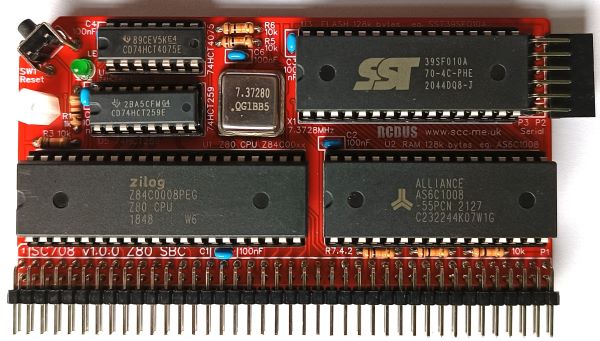
- SC708 – Z80 single board computer module
- SC709 – Backplane, 12+1, 5-volt input
- SC710 – Backplane, 12+1
- SC711 – Prototyping module (large profile)
- SC712 – Power supply and reset module, 5-volt input
- SC713 – RCBus tool (pin-puller / ruler)
- SC714 – Memory module, 512k ROM + 512k RAM
- SC715 – Compact Flash module
- SC716 – Z80 SIO/2 serial module
- SC717 – Z80 PIO digital module
- SC718 – Z80 CTC timer module
- SC719 – Digital I/O module
- SC720 – Z80 single board computer (SBC)
- SC721 – Z180 memory module
- SC722 – Z180 CPU module
- SC723 – Backplane, 3-slot, 5-volt input
- SC724 – Breakout prototyping module (large profile)
- SC725 – Z80 SIO/2 + Z80 CTC module
- SC726 – Clock oscillator module
- SC727 – Real time clock module
- SC728 – Module riser
- SC729 – Compact Flash module
- SC730 – Z80 CPU + MMU module
- SC731 – Dual PWM module
- SC732 – Dual servo controller module
- SC733 – Prototyping module (standard profile)
- SC734 – Micro SD module
- SC735 – Prototyping module (very large, 1 x 80 pin bus)
- SC736 – Prototyping module (very large, 2 x 80 pin bus)
- SC737 – Interrupt generator (50Hz) module
- SC738 – Reset module
- SC791 – Z80 RomWBW modular computer
- SC792 – Z180 RomWBW modular computer
Obviously, the most important question is: “What colour should it be?”
SC700 series PCBs are offered in a range of colours (B=Blue, G=Green, K=Black, W=White, R=Red) as individual boards and, in some cases, as parts of kits. In addition, the design files are available for you to have your own boards manufactured in these or other colours.
Below is a list of SC700 series products designed for the RCBus.


† SC126 is not part for the SC700 series but it is so close to what I would now design for the SC700 series it is not worth changing.
You can make your system with a mix of colours if you really want to stand out from the crowd or if you can’t make your mind up!
With the difficult colour decision out of the way, the next question is; “What do you want to do with your retro computer?”
Consider the following questions:
- Do you want to just run existing software?
- Do you want to write software?
- Do you want to experiment with hardware?
- Do you want your system in a neat box?
- Will you be making changes to the hardware over time?
- How authentic (retro) do you want your system?
- Do you want to run CP/M?
- Do you want to run RomWBW?
What bits do you need?
A typical minimal system requires:
- Backplane (to connect the modules)
- Power supply
- Reset circuit
- A clock
- A central processing unit (CPU)
- Memory (RAM and ROM)
- A serial port
These functions can all be provided on a single motherboard or they can be split in a variety of ways on a number of modules. Additional functions can be added with plugin modules.
Motherboards
Motherboards are essentially a single board computer (SBC) with bus sockets for expansion. All SC700 series motherboards have a horizontal bus connector to allow modular backplane sections to be added.
| Motherboards | SC720 | SC126 † |
| CPU | Z80 | Z180 |
| Clock (MHz) | 7.3728 | 18.432 |
| Reset | Yes | Yes |
| Supervisor | Yes | Yes |
| Power in via serial | Yes 5 volts | Yes 5 volts |
| Power in connector | Yes 8 to 15 volts | Yes 5 volts |
| Power in via module | No | optional |
| RAM (kB) | 512 | 512 |
| ROM (kB) | 2 x 512k | 2 x 512k |
| Firmware | 1/ RomWBW 2/ SCM | 1/ RomWBW 2/ SCM |
| Serial ports | 2 | 2 |
| Baud rate | 115200 | 115200 |
| Status LEDs | 11 | 9 |
| Storage | CF card | SD card |
| Storage via module | – | CF card (option) |
| Other | None | None |
| Vertical bus sockets | 2 | 2 |
| Horizontal bus socket | Yes | Yes |
† SC126 is not part for the SC700 series but it is so close to what I would now design for the SC700 series it is not worth changing.
RomWBW includes CP/M and a range of other useful software. It has been produced by Wayne Warthen and included with his permission, free of charge.
SCM is the Small Computer Monitor – a capable monitor for software and hardware development and debugging.
Systems
To make it easier to select the required parts the following are available as complete systems. The details below are for the systems with default options selected when purchasing. In some cases there are options for alternative modules and backplanes to customise the system.
| Systems | SC791 | SC792 | SC794 |
| Configuration described here | default | default | default |
| CPU | Z80 | Z180 | Z80 |
| Clock (MHz) | 7.3728 | 18.432 | 7,3728 |
| Reset | Yes | Yes | Yes |
| Supervisor | Yes | Yes | Yes |
| Power in via serial | Yes 5 volts | Yes 5 volts | Yes 5 volts |
| Backplane power in connector | No | Yes 5 volts | Yes 5 volts |
| Power in via module | Yes 8 to 15 volts | optional | optional |
| RAM (kB) | 512 | 512 | 512 |
| ROM (kB) | 512 | 512 x 2 | 512 x 2 |
| Firmware | RomWBW | RomWBW SCM | RomWBW SCM |
| Serial ports | 2 | 2 | 2 |
| Baud rate | 115200 | 115200 | 115200 |
| Status LEDs | 3 | 2 | 4 |
| Storage | CF card | SD card | CF card |
| Storage via module | – | CF card (optional) | – |
| Other | None | None | None |
| Free bus sockets | 3 | 5 | 3 |
| Horizontal bus socket | Yes | Yes | Yes |
| Backplane | SC701 | SC701 | SC701 |
| Modules | SC706 SC714 SC715 SC716 | SC721 SC722 | SC716 SC721 SC729 SC730 |
Backplanes
Most SC700 series backplanes can be extended by joining backplane sections together. These backplanes have a number of vertical connectors for modules plus a horizontal connector for an additional backplane section or a module.
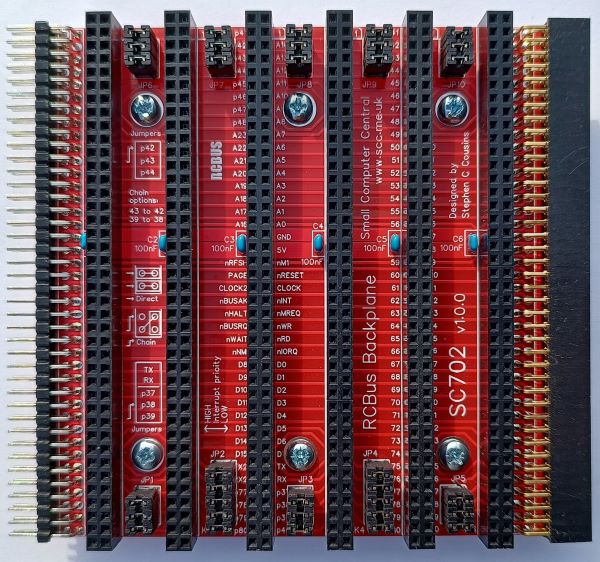
The horizontal connector can also accept a module, which makes it more accessible for experimenting and debugging hardware.
| Modular backplanes | SC701 | SC702 | SC709 | SC710 |
| Bus pins | 80 | 80 | 80 | 80 |
| Vertical sockets | 6 | 6 | 12 | 12 |
| Horiontal socket | Yes | Yes | Yes | Yes |
| Horzontal plug | No | Yes | No | Yes |
| Power input | 5 volt 1 amp | No | 5 volt 1 amp | No |
| Reset | Yes | No | Yes | No |
| Supervisor | Yes | No | Yes | No |
| Module spacing | 0.6″ 15.24mm | 0.6″ 15.24mm | 0.6″ 15.24mm | 0.6″ 15.24mm |
| Other backplanes | SC723 | |||
| Bus pins | 80 | |||
| Vertical sockets | 3 | |||
| Horiontal socket | No | |||
| Horzontal plug | No | |||
| Power input | 5 volt 1 amp | |||
| Reset | Yes | |||
| Supervisor | Yes | |||
| Module spacing | 0.6″ 15.24mm |
Power supply
There are several ways to power an SC700 series system:
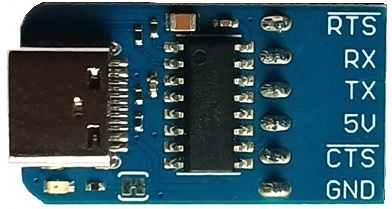
From a Serial to USB adapter. SC700 series serial ports have a 5-volt input pin which can be used to power the system. This works for modest size systems but isn’t ideal.
From a backplane. Backplanes can include a power input connector. This is generally preferable to powering from a serial port.

Another option is to power an SC700 series system from a power module. Power modules also provide a good quality clean reset signal and status indicator lights.
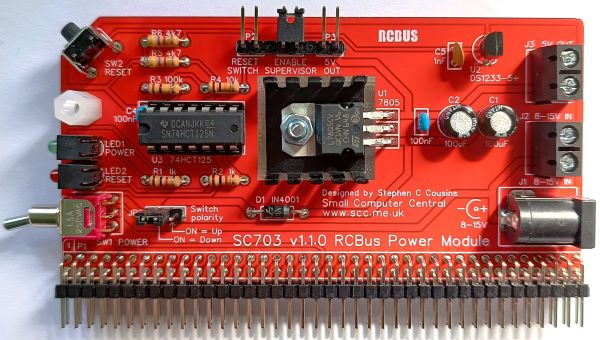
The first method of powering the system typically takes the power from a modern computer via a USB socket. The other two methods generally require a wall-mounted (wall-wart) power adapter.
| Power modules | SC703 | SC712 |
| Voltage input | 8-12 volt | 5 volt |
| Max current | 1 amp | 1 amp |
| Reset | Yes | Yes |
| Supervisor | Yes | Yes |
| Status LEDs | 2 | 2 |
Processor
The SC700 series offers a choice of two microprocessors:
- The Z80 was extremely popular in the late 70s and 80s.

- The Z180 was introduced later as advances in integrated circuit manufacture allowed more complex designs.
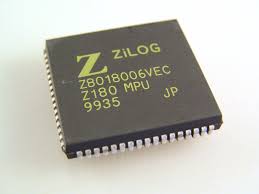
The Z180 is essentially software compatible with the Z80 but includes extra functions such as serial ports. The Z180 allows physically smaller systems to be created and also reduces the system cost.
If you want a system nearest to an authentic 1980 computer you should use the Z80 processor. If you are willing to use later technology then a Z180 based system will be a good choice.
| Processor modules | SC706 | SC708 | SC730 |
| CPU | Z80 | Z80 | Z80 |
| Clock (MHz) | 7.3728 | 7.3728 | 7.3728 |
| Reset button | Yes | Yes | No |
| Supervisor | Option | No | No |
| RAM (kB) | None | 128k | None |
| ROM (kB) | None | 128k | None |
| Serial ports | None | 9600 baud bit-bang | None |
| Baud rate | n/a | 9600 | n/a |
| Firmware | None | SCM BASIC CP/M loader | None |
| Status LEDs | None | 1 | None |
| Other | Clock (option) | None | Memory management unit (MMU) |
| Processor modules | SC722 |
| CPU | Z180 |
| Clock (MHz) | 18.432 |
| Reset button | No |
| Supervisor | No |
| RAM (kB) | None |
| ROM (kB) | None |
| Serial ports | 2 |
| Baud rate | 115200 selectable |
| Firmware | None |
| Status LEDs | 1 |
| Other | SPI for SD card MMU |
Memory
Typical Z80 systems in 1980 had 64k bytes of RAM. It is possible to have more than 64k bytes of RAM on a Z80 system but it is easier to implement significantly larger memory maps with the Z180 processor.
| Memory modules | SC707 | SC714 | SC721 |
| RAM (kB) | 128 | 512 | 512 |
| ROM (kB) | 128 | 512 | 512 |
| Fimrware | SCM | RomWBW | RomWBW SCM |
| For CPU | Z80 | Z80 | Z180 (SC722) Z80 (SC730) |
| Status LEDs | 2 | None | None |
Serial ports
Most systems include at least one serial port. This allows the retro computer to use a terminal, or modern computer acting as a terminal, as the main user interface.
| Serial modules | SC705 | SC716 | SC725 |
| Ports | 1 | 2 | 2 |
| Baud rate | 115200 | 115200 | 115200 |
| Baud rate control | No | No | Yes |
| Device | 68B50 ACIA | Z80 SIO/2 | Z80 SIO/2 Z80 CTC |
| Extras | None | None | Timers |
Storage
If you want to load and save files you will need some form of storage. While it is possible to transfer data to and from a modern computer via a serial port, it is generally better to have some local storage on the retro computer.
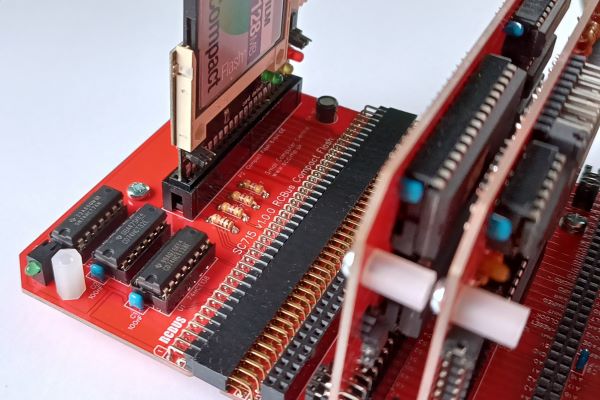
| Storage modules | SC715 | SC729 | SC734 † |
| Device | Compact- Flash | Compact- Flash | Micro SD Card |
| OS support | CP/M RomWBW | CP/M RomWBW | RomWBW inc. CP/M |
† Support requires RomWBW v3.5 or a customised earlier version.
Digital I/O modules
Digital input/output modules can include signals to interface to external electronics and/or LEDs and switches. Input/output signals can either be fixed inputs or outputs, or they can be programmable bi-directional signals.
| Digital I/O modules | |||
| Digital I/O modules | SC717 | SC719 | |
| Device | Z80 PIO | 74 series logic | |
| Bi-directional signals | Yes (16) | None | |
| Signal outputs | None | Yes (8) | |
| Output LEDs | None | Yes (8) | |
| Signal inputs | None | Yes (8) | |
| Input LEDs | None | Yes (8) |
Prototyping modules
| Prototyping modules | SC711 | SC724 | SC733 |
| Features | 4.0″ x 4.0″ – 03″ & 0.6″ DIL layout – 80 pin bus – | 4.0″ x 4.0″ – 03″ & 0.6″ DIL layout – 80 pin bus – Flexible address decoder | 4.0 x 2.1″ – 03″ & 0.6″ DIL layout – 80 pin bus – |
| Prototyping modules | SC735 | SC736 |
| Features | 4.0″ x 8.2″ – 03″ & 0.6″ DIL layout – 1 x 80 pin bus | 4.0″ x 8.2″ – 03″ & 0.6″ DIL layout – 2 x 80 pin bus |
Other modules
| Other modules | SC704 | SC718 | |
| Features | I2C bus master | Z80 CTC Counters Timers Interrupts Frequency |
| Other modules | SC731 | SC732 | |
| Features | Two channel pulse width modulation (PWM) outputs | Two channel servo controller |
| Other modules | SC737 | ||
| Features | Interrupt (50Hz) generator |
 Small Computer Central