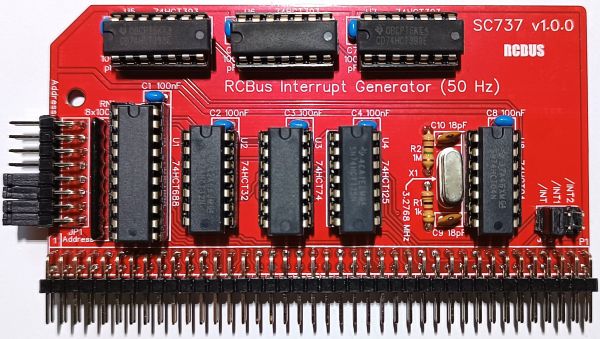
SC737 is a 50 Hz interrupt generator module designed for the RCBus.
- SC737 – Assembly guide
- SC737 – Compatibility
- SC737 – Parts list
- SC737 – Printed circuit board
- SC737 – User guide
- SC700 series information
- SC700 series support
Downloads
- SC737, v1.0, Kit contents sheet (PDF)
- SC737, v1.0, Schematic (PDF)
- SC737, v1.0, PCB design files (OSHWLab)
- SC737, v1.0, Gerber files (ZIP)
Errata
- Nothing known
Suppliers
| Kits | Website | From | Currency |
| Small Computers Direct | SCDirect | UK | GBP |
| Stephen C Cousins | Tindie | UK | USD |
| Small Computer Central | Lectronz | UK | Euro/USD |
| PCBs | Website | From | Currency |
| Small Computers Direct | SCDirect | UK | GBP |
| Stephen C Cousins | Tindie | UK | USD |
| Small Computer Central | Lectronz | UK | Euro/USD |
| Assembled and Tested | Website | From | Currency |
| Not available | |||
| Components | |||
| See parts list |
Tindie does not collect VAT for EU countries
Lectronz does collect EU VAT for orders up to 150 EUR
Parts List
| Reference | Qty | Component |
| PCB | 1 | SC737, v1.0, PCB |
| C1 to C8 | 8 | Capacitor, ceramic, 100 nF |
| C9 to C10 | 2 | Capacitor, ceramic, 18 pF |
| JP1 | 1 | Header, male, 2 row x 8 pin, angled |
| JP2 | 1 | Header, male, 2 row x 3 pin, straight |
| Jumper | 9 | Jumper shunt |
| P1 | 1 | Header, male, 2 row x 40 pin, angled |
| R1 | 1 | Resistor, 1k, 0.25W |
| R2 | 1 | Resistor, 1M, 0.25W |
| RN1 | 1 | Resistor network, 8x100k, SIL, 9-pin |
| Screw (for spacer) | 1 | Machine screw, 6mm, M3 |
| Spacer | 1 | Spacer, 10mm, M3, nylon |
| U1 | 1 | 74HCT688 |
| U2 | 1 | 74HCT32 |
| U3 | 1 | 74HCT74 |
| U4 | 1 | 74HCT125 |
| U5 to U7 | 3 | 74HCT393 |
| U8 | 1 | 74HCT04 |
| X1 | 1 | Oscillator, 3.2768 MHz |
| IC socket 20-pin U1 | 1 | Socket, DIP, 20-pin |
| IC socket 14-pin U2 to U8 | 7 | Socket, DIP, 14-pin |
Printed Circuit Board
User Guide
SC737 is a module dedicated to generating a 50 Hz (20 ms) tick interrupt. It occupies a single I/O address, which is set with jumpers.
At reset, the 50 Hz interrupt is disabled. Writing bit 7 high to the module’s I/O address enables the interrupt, and writing bit 7 low disables the interrupt.
Reading the I/O address returns the interrupt request status and a 50 Hz counter. If the module is requesting an interrupt, bit 7 is low. To clear the interrupt request bit, write bit 7 low, then high. A two bit counter, bits 0 and 1, increments each time the 50 Hz timer rolls over. This allows simple software to poll the timer in order to wait for the next 50 Hz event. It also enables software to detect missed interrupts.
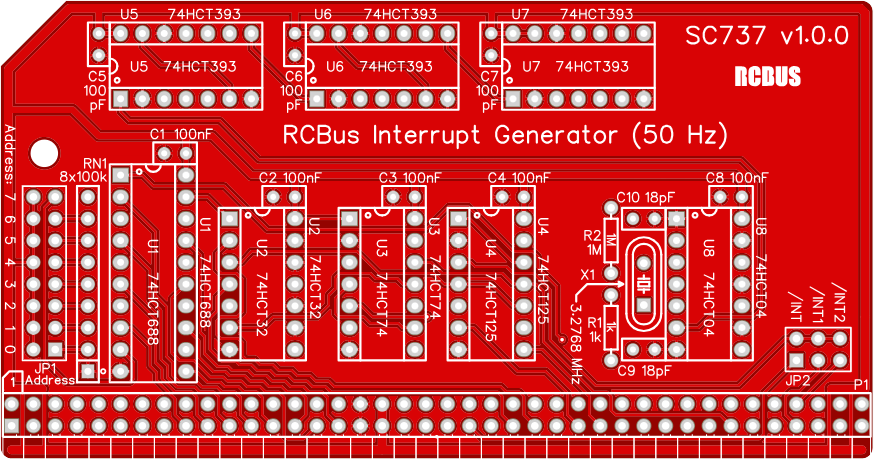
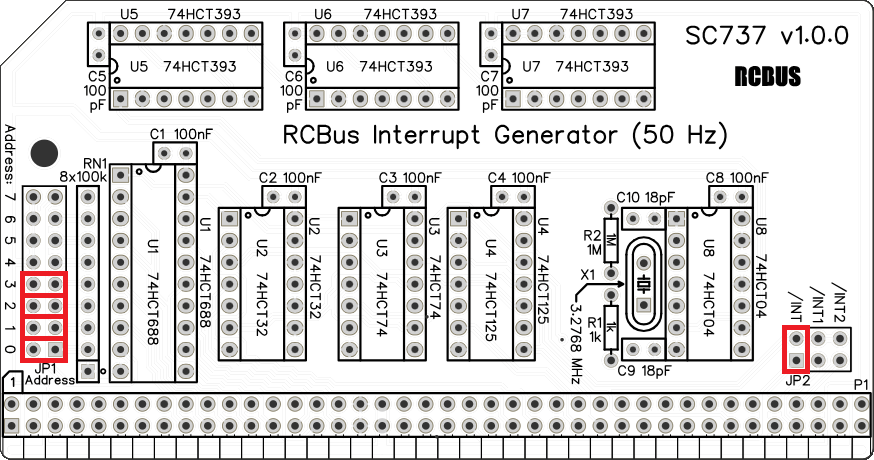
The module’s I/O address is set with jumpers (JP1). The module responds to input/output addresses matching the address set with these jumpers. When a jumper shunt is fitted, that bit must be a 1 (high voltage). When the shunt is not fitted, that bit must be a 0 (low voltage). The card has tight address decoding and only occupies a single input/output port address. Typically, the address will be 0x0F which is selected by fitting jumper shunts to JP1 bits 0, 1, 2 and 3.
The module provides a choice of three bus pins as the destination for the interrupt signal generated. JP2 is used to select the required bus pin. The standard interrupt signal is bus pin 22 (/INT). The alternatives are pin 37 (USER1, assigned as /INT1) and pin 77 (USER5, assigned as /INT2).
This module does not offer interrupt mode 2 support, so typically it is used in interrupt mode 1. It is possible to create a system where the interrupt signals, /INT1 and /INT2, are detected by a module that can generate mode 2 interrupts from simple interrupt signals. Typically, this is achieved with a Z80 family peripheral such as a Z80 CTC, a Z80 PIO, or a processor with additional interrupt pins, such as the Z180.
Software writers should be aware that the 50 Hz signal is not synchronised to the Z80 instruction cycle. Thus, the 50 Hz count bits and the interrupt request bit can change at literally any time, such as the middle of an I/O port read. As a result, it is possible (but rare) that 1/ an interrupt can be missed during the narrow window the interrupt request is being cleared, and 2/ the ripple counter bits could be inconsistent with one bit having settled and the other still in the process of changing. The fix for this is to wait until two consecutive reads return the same value, ignoring the unused bits 2 to 6. A stable counter value can be compared with the last stable counter value to determine the number of clock ticks that have passed. This can be used to detect missed interrupts.
Input/output port functions
| RCBus I/O Address | Read | Write |
| Configurable *1 | Input bits 0: Clock tick count 0 1: Clock tick count 1 2: not used 3: not used 4: not used 5: not used 6: not used 7: Interrupt request | Output bits 0: Not used 1: Not used 2: Not used 3: Not used 4: Not used 5: Not used 6: Not used 7: Interrupt enable |
- The RCBus I/O base address should be set to match the software you are using. Typically, this is 0x0F (jumper shunts fitted for bits 0 to 3).
Jumper options
| Jumper | Function |
| JP1 | Set module’s RCBus I/O address The default is 0x0F |
| JP2 | Select destination for INTERRUPT signal JP2.1 Connect INTERRUPT to RCBus pin 22 (/INT) JP2.2 Connect INTERRUPT to RCBus pin 37 (/INT1) JP2.3 Connect INTERRUPT to RCBus pin 77 ( /INT2) The default is JP2.1 (/INT) |
Connectors
| Connector | Function |
| P 1 | RCBus connector |
Assembly Guide
Below is the suggested order of assembly. A general guide to assembling circuit boards can be found here.
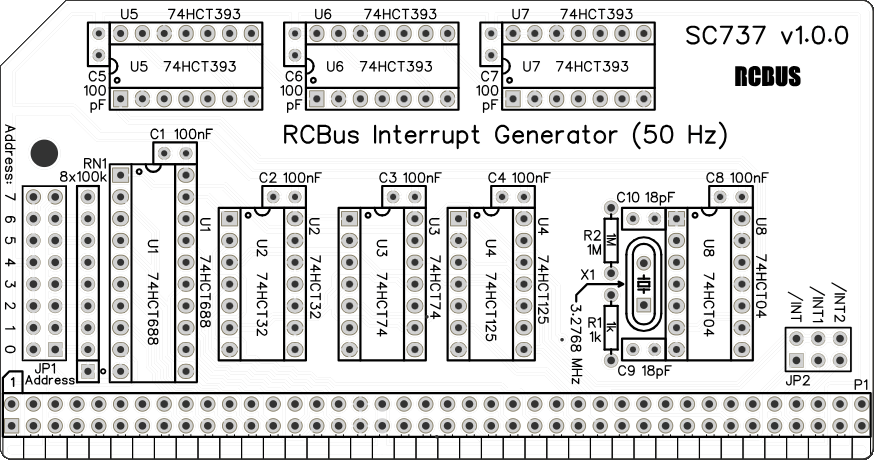
- Resistors R1 (1k) and R2 (1M)
These can be fitted either way around - Decoupling capacitors C1 to C8 (100 nF)
These can be fitted either way around - Decoupling capacitors C9 to C10 (18 pF)
These can be fitted either way around - Sockets for U1 to U8
Fit such that the notch in the socket matches the curve in the outline on the PCB silkscreen - Crystal X1 (3.2768 MHz)
This can be fitted either way around - Resistor network RN1 (8 x 100k)
These must be fitted the correct way around whereby the dot on the component matches the dot on the PCB silkscreen - Bus header P1
Make sure the pins are parallel to the PCB so that the board is vertical when it is fitted into a backplane socket - Header pins JP1 (2 row x 8 pin, angled)
- Header pins JP2 (2 row x 3 pin, straight)
- Insert the integrated circuits into their sockets
Make sure the notch in the component is at the end indicated by the notch in the socket and the curve on the PCB silkscreen - Fit the nylon spacer in the mounting hole
Fit jumper shunts in the positions shown below. All other jumpers are optional and should only be fitted if the feature is required.
Compatibility
This module conforms to the RCBus specification v1.0 for RCBus-2014 and RCBus-Z80.
The RCBus specification includes RCBus-2014 (both RC2014 standard 40-pin bus and RC2014 enhanced 60-pin bus) and also the full 80-pin RCBus. The 80-pin RCBus provides support for advanced Z80 features, such as the interrupt daisy-chain, as well as support for other processor families.
The table below indicates electrical compatibility with each backplane type (40, 60 and 80 pin)

| Backplane | ? | Compatibility notes |
| RCBus 80-pin |  | Fully supported |
| RCBus 60-pin (RC2014 enhanced) | | Limitations: Optional signal /INT2 not available |
| RCBus 40-pin (RC2014 standard) | | Limitations: Optional signal /INT2 not available |
Notes
- This product is designed for hobby use and is not suitable for industrial, commercial, or safety-critical applications.
- The product contains small parts and is not suitable for young children.
 Small Computer Central