SC118 is a Z80 processor card designed for the Z50Bus.
SC516 is a later version of this design

Documentation
Downloads
Suppliers
- SC118 – Kit (Tindie) – discontinued (replaced with SC516)
- SC118 – PCB (Tindie)
Description
SC118 is an easy to build Z80 Single Board Computer card.
The aim of this design is to make entry into the Z50Bus universe as easy and reliable as possible. This is achieved by using relatively few components, and thus minimal soldering. There are also no configuration jumpers to worry about.
This card can work in a modest way as a single board computer (SBC), without even needing a backplane, yet can easily be expanded to run CP/M and more.
Here are the specs:
- Z80 running at 7.3728 MHz
- 128k bytes RAM (second 64k not easy to use, so best consider it to be 64k usable)
- 32k bytes ROM, which can be paged out with the usual write to port 0x38
- Simple bit-bang serial port to get you started
- Reset button
- Voltage supervisor for clean reset
- LED for power and status indication
- Runs the Small Computer Monitor, with ROM BASIC and the CP/M loader included
The idea is that you first build the board and tested it as a single board computer.
Next you build a Z50Bus backplane and check the processor card still works when connected to the backplane.
The next step would be to build and test a proper serial port, which gives better performance and compatibility with the current CP/M distribution.
Then if you want CP/M all you need to add is a Z50Bus Compact Flash adapter and a Compact Flash card with a suitable CP/M distribution installed. All this is supported by the ROM with no configuration required.
User Guide
The SC118, Z80 Processor Card can be used in two basic ways:
- As a Single Board Computer (SBC).
- As the processor card in a Z50Bus system.
Version 1.1 adds a Voltage Supervisor and Reset device the the circuit board.
Single Board Computer
This card can be used in a modest say as a Single Board Computer. The card is connected to a computer or terminal with an FTDI style serial adapter. This also provides the 5V 100mA power for the card.
This serial port is very basic, providing only a software generated 9600 baud, 8 data bit, 1 stop bit, no parity serial interface. It is designed to provide a very low cost ‘starter’ port to get the system up and running as easily and cheaply as possible. It is suitable for simple applications, but a more capable serial module should be added for sophisticated applications such as running CP/M.
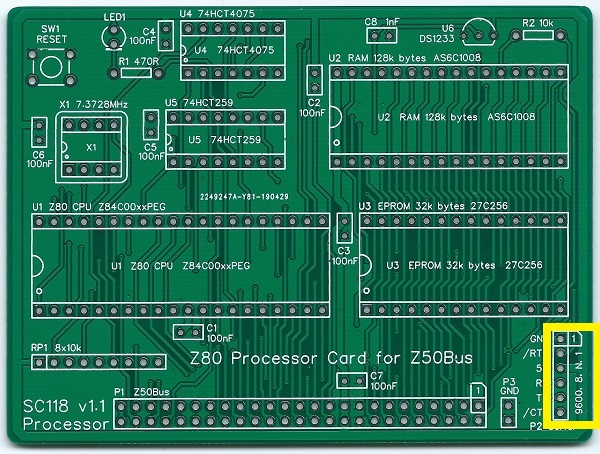
The pin-out, below, describes signals with respect to the card, so an output is and signal from the card to a computer or terminal.
| Pin | Function |
| 1 | Ground (GND) |
| 2 | Request To Send (RTS) output |
| 3 | Vcc (5V) |
| 4 | Recieve Data (RxD) input |
| 5 | Transmit Data (TxD) output |
| 6 | Clear To Send (CTS) input (not connected) |
Z50Bus System
A more capable system can be created using this card as the processor and memory for a Z50Bus computer.
The most likely first addition would be an SC125, Serial card. This provides two asynchronous serial ports, software controlled baud rates, and a timer.
Software, CP/M
version of CP/M 2.2 is available for SC118, Z80 Processor card.
New versions, together with more detailed instructions, are available here.
This version is specifically for SC118 (Z80 Processor card) plus SC125 (Serial and timer card), with the Small Computer Monitor v1.0 configuration F1 in ROM.
It supports the two serial ports on serial card SC125, and the Compact Flash interface card SC127. CP/M uses the serial ports with the settings supplied by the Small Computer Monitor.
The CP/M software is supplied (below) in the form of a “PutSys” program. This program is loaded and run from the Small Computer Monitor and installs CP/M to a formatted Compact Flash card. Once installed to Compact Flash, CP/M can be started with the command “CPM”, from the Small Computer Monitor.
Downloads
This file is required to set up CP/M on the Z50Bus system:
Instructions
Instructions to install CP/M 2.2 on to a Compact Flash card can be found here.
Parts List
| Reference | Qty | Component |
| PCB | 1 | SC118, v1.1, PCB |
| C1 to C7 | 7 | Capacitor, ceramic, 100 nF |
| C8 | 1 | Capacitor, ceramic, 1 nF |
| P1 | 1 | Header, male, 2 x 25 pin, angled |
| P2 | 1 | Header, male, 1 x 6-pin, angled, or Header, male, 1 x 6-pin, straight |
| P3 | 1 | Header, male, 1 x 2 pin, straight |
| R1 | 1 | Resistor, 470R, 0.25W |
| R2 | 1 | Resistor 10k 0.25W |
| RP1 | 1 | Resistor pack, 8 x 10k, SIL, 9-pin |
| SW1 | 1 | Tactile button |
| LED1 | 1 | LED green 3mm |
| U1 | 1 | Z80 CPU Z84C0008PEG |
| U1 socket | 1 | 40-pin DIP socket |
| U2 | 1 | RAM 128k bytes AS6C1008 |
| U2 socket | 1 | 32-pin DIP socket |
| U3 | 1 | EPROM OTP 32k bytes 27C256 |
| U3 socket | 1 | 28-pin DIP socket |
| U4 | 1 | 74HCT4075 |
| U4 socket | 1 | 14-pin DIP socket |
| U5 | 1 | 74HCT259 |
| U5 socket | 1 | 16-pin DIP socket |
| U6 | 1 | DS1233-5+ EconoReset |
| X1 | 1 | Oscillator 7.3728 MHz |
| X1 socket | 1 | 8-pin PDIP socket (optional) |
Printed Circuit Board


This board is made to the Z50Bus Standard dimensions.
| Part number | Links |
| Tindie: SC118 | PCB only |
| Tindie: SC118 | Complete kit |
| EasyEDA: SC118 | PCB design files |
| Gerbers: SC118 | Gerber files |
Assembly Guide
Experienced builders
There is only one suggested build option to watch out for. You can fit either a straight or a right angled header to P2 (serial port). Other than that there shouldn’t be any surprises to catch you out, so experienced builders can just go ahead and populate the board.
This guide assumes you are familiar with assembling circuit boards, soldering, and cleaning. If not, it is recommended you read some of the guides on the internet before continuing.
First check you have all the required components.
Before assembling it is worth visually inspecting the circuit board for anything that looks out of place, such as mechanical damage or apparent manufacturing defects.
If you have a multimeter that measures resistance or has a continuity test function, check there is not a short on the power supply tracks. Connect the probes to each terminal of one of the capacitors, such as C1. This should be an open circuit, not a short.
The picture below shows what a completed SC118, Z80 Processor Card should look like.

Resistors
Fit and solder the 470R resistor R1 (shown below in red).
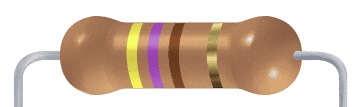
Fit and solder the 10k resistor R2 (shown below in yellow).
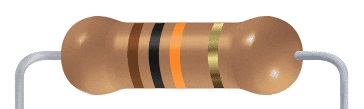
These can be fitted either way around, as they are not polarity dependent.

IC sockets
Fit and solder IC sockets for U1 to U5 (shown below in yellow).
You may wish to fit a socket for oscillator X1 (shown below in red). My preference is to solder this component.
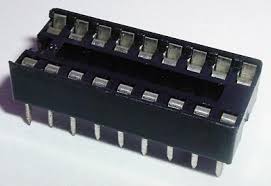
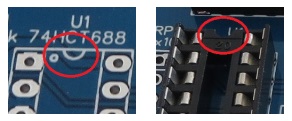
Be sure to fit them with the notch matching the legend on the circuit board, so you do not end up fitting the IC the wrong way around too.

Capacitors
Fit and solder capacitors C1 to C7 (shown below in yellow).

Fit and solder capacitor C8 (shown below in red).
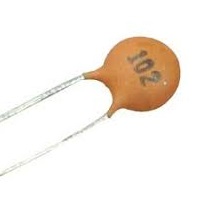
These can be fitted either way around, as they are not polarity dependent.

Switch and LED
Fit and solder the push button switch SW1 (shown below in red).
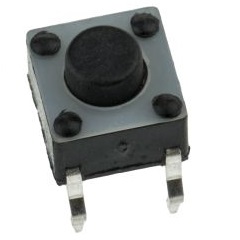
Fit and solder the LED (shown below in yellow).
It is important to fit the LED the correct way around. LEDs usually have a small flat side to indicate the cathode (the negative end). This should be positioned to match the flat side shown on the circuit board (illustrated to the right). Also, the cathode pin on the LED is usually shorter than the other pin (the Anode).


The LED can either be fitted vertically, pointing away from the board, or the legs can be bent 90 degrees, so the LED lays flat against the board. Laying flat makes it easier to see when this card is mounted on a backplane with other cards.

Bus Connector
This connector is not needed if you only intend to use the board as a Single Board Computer (SBC) and never intend to fit it into a backplane.
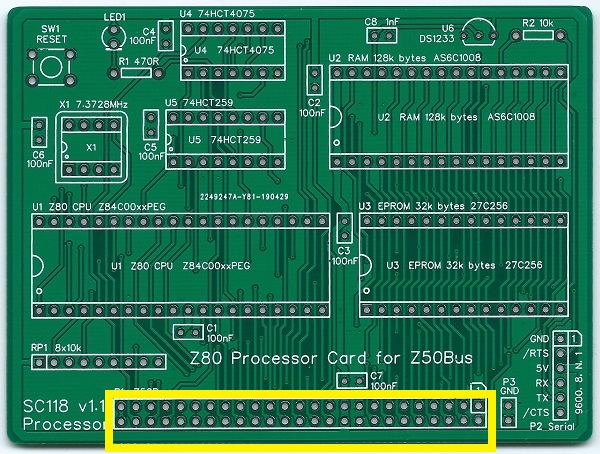
Fit and solder bus connector P1.
You may need to cut the connector strip to length (if starting with a strip more than 25 pins long). Long nose wire cutters snip through the plastic quite easily.
Take care to ensure the pins are parallel to the circuit board so that the board will be vertical when plugged into a backplane.
Serial Header
Fit and solder connector P2.
You can either fit straight pins or angled pins.
Angled pins generally gives better access when mounted on a backplane, but fit straight pins if the card is to be used with card guides as suggested in the Z50Bus specification.
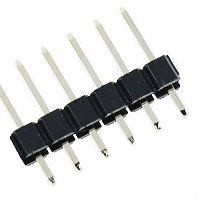
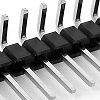
This header may need to be cut down from a longer strip.
Take care to ensure the pins are perpendicular (straight pin) or parallel (angled pins) to the circuit board.
Ground Test Point
Fit and solder header pins P3.
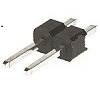

Oscillator
If you decided to solder the 7.3727 MHz oscillator, be sure to fit it the correct way around.
Pin 1 of the oscillator is normally indicated by a ‘sharp’ corner, while the other three corners are rounded.
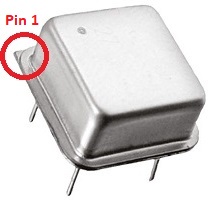
Pin 1 on the circuit board is also indicated by a ‘sharp’ corner, while the other three corners are rounded.


Resistor Network
Fit and solder the 8x10k resistor network RP1.
This must be fitted the correct way around. The component should have pin 1 marked with a dot, as illustrated right.



Voltage Supervisor and Reset
Fit and solder the DS1233 voltage supervisor and reset device U6.
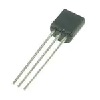
This device must be fitted the correct way around. Match the shape of the device to the legend on the circuit board.
It is necessary to spread the legs of the device to match the hole spacing on the circuit board. Do this gently so as too avoid straining the legs. DO not press the component hard into the board as this will also strain the legs.

Inspection
Remove any solder ‘splats’ with a brush, such as an old toothbrush.
Visually inspect the soldering for dry joints and shorts.
Clean the flux off with suitable cleaning materials.
Visually inspect again.
With a suitable FTDI style TTL level serial to USB adapter connected from P2 to a powered USB socket, check the supply voltage on this circuit board between U4 pin 7 and U4 pin 14. This should be 4.5 to 5.5 volts, preferably 4.75 to 5.25 volts. Unplug the serial adapter.
Integrated Circuit U5
Insert the IC U5 (74HCT259) into its socket, taking care to insert it the right way around, as illustrated below. Be careful not to bend any legs over.


Test
With a suitable FTDI style TTL level serial to USB adapter connected from P2 to a powered USB socket, check the LED lights. If not then follow these steps.
- Check the supply voltage between U5 pin 8 and U5 pin 16. This should be 4.5 to 5.5 volts, preferably 4.75 to 5.25 volts.
- Check the LED is the correct way around.
- Check the RESET signal is high but goes low when the reset button is pressed. The LED should light when U5 is powered and working, and the RESET signal on U5 pin 15 is low. With the other ICs not fitted the LED may not stay on after the RESET signal goes high.
Do not continue assembly until the LED is working.
Integrated Circuits
Insert the ICs into their sockets, taking care to insert them the right way around, as illustrated below. Be careful not to bend any legs over.

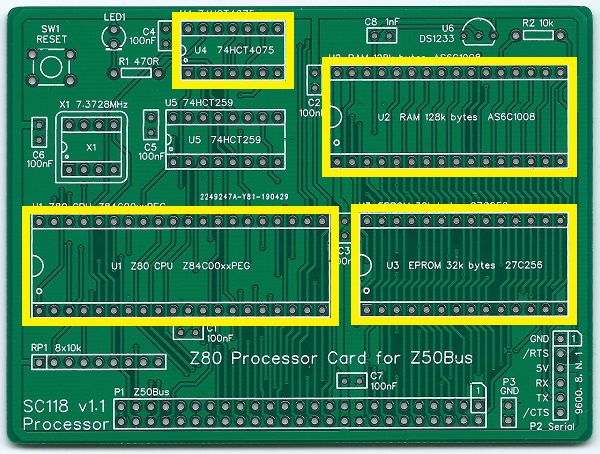
Oscillator
If you elected to fit a socket for oscillator X1, then insert the oscillator now. See instruction above regarding orientation.
Quick Start Guide
Below is a very brief guide to getting started with the SC118, Z80 Processor Card. For further details so the SC118 User Guide.
The ROM should contain the Small Computer Monitor v1.0 configuration F1.
Connect a suitable FTDI style TTL level serial to USB adapter from P2 to a powered USB socket on a PC (or similar). These adapters come in many different shapes and sizes. The picture below shows one possible configuration.

Press the reset button and check the LED lights. It should flash off and on again, twice, and then remain on.
Start a suitable terminal emulation program, such as Tera Term, on the PC (or equivalent). Configure the PC’s serial port for 9600 baud, 8 data bits, 1 stop bit, no parity and hardware flow control (RTS/CTS). There is no need to set the terminal software to add delays. Almost any terminal emulation should work with the Small Computer Monitor.
Press the reset button on the SC118 Processsor Card. You should see the terminal program display something like “Small Computer Monitor – F1”.
You are now ready to play!
Fault Finding
Check there are no chips with bent legs and thus not making contact with their socket, carefully inspect all soldering, check all the chips are inserted the right way around, check all the components are in the right place.
With a suitable FTDI style TTL level serial to USB adapter connected from P2 to a powered USB socket, check the supply voltage on this circuit board between, say, U4 pin 7 and U4 pin 14. This should be 4.5 to 5.5 volts, preferably 4.75 to 5.25 volts. Insufficient voltage can lead to the DS1233 Voltage Supervisor holding the reset line low.
Check the LED is on. If it is not, then check the LED is the correct way around. Also check the RESET signal is high but goes low when the reset button is pressed. The LED should light when U5 is powered and working, and the RESET signal on U5 pin 15 is low.
If the LED is working, check it flashes off then on again, either once or twice after a reset. If it flashes then the motherboard is running code successfully. This would indicate that all the main components are generally working. If the LED flashes off once after reset the system has detected a serial card plugged into one of the Z50Bus. If it flashes off twice it has not detected a serial card and is using the onboard serial port (P2). If it keeps flashing the self-test has failed, most likely indicating the RAM is not working.
Circuit Explained
The SC118, Z80 Processor card can be used in a modest way as a Single Board Computer (SBC) or as part of a modular computer based on the Z50Bus.
C1 to C7
These capacitors provide power supply decoupling (or bypass). The fast switching in digital circuits creates spikes on the power supply lines which are suppressed with decoupling capacitors placed at key points on the circuit board.
C8
This capacitor is required by the Voltage Supervisor and Reset device (DS1233-5+, U6) when an external reset switch and pull-up resistor are connected to the reset line. See DS1233-5+ datasheet for more details.
P1
This is the standard Z50Bus connector.
P2
The card includes a simple bit-bang 5 volt, FTDI style, serial port. The connection to this is the 6-pin header, P2. You can either fit a straight or a right angled header. The angled connector is usually more convenient. If the card is to be supported by guides, as suggesting in the Z50Bus specification, then straight pins must be fitted.
This port is very basic, providing only a software generated 9600 baud, 8 data bit, 1 stop bit, no parity serial interface. It is designed to provide a very low cost ‘starter’ port to get the system up and running as easily and cheaply as possible. It is suitable for simple applications, but a more capable serial module should be added for sophisticated applications such as running CP/M.
The pin-out, below, describes signals with respect to the SC118 card, so an output is and signal from the card to a computer or terminal.
| Pin | Function |
| 1 | Ground (GND) |
| 2 | Request To Send (RTS) output |
| 3 | Vcc (5V) |
| 4 | Recieve Data (RxD) input |
| 5 | Transmit Data (TxD) output |
| 6 | Clear To Send (CTS) input (not connected) |
P3
A pair of simple ground pins are provided as a convenient place to attach test leads.
R1
This resistor sets the LED current. You may change this value from about 330R to 1K depending on the type of LED you fit and your preference for brightness. A value of 470R will work fine with just about any LED, so if in doubt use this value.
R2
R2 pulls up the Z80 reset input (/RESET). The reset line is pulled low to reset the system.
RP1
This resistor network provides pull-ups for bus signals that may otherwise be left floating, or are used with open collector signals.
SW1
This is the reset switch, which pulls down the backplane’s reset signal (/RESET) and thus resets the system. This simple motherboard does not have a power-on reset, so it will usually be necessary to press this button after the system is turned on.
LED1
This LED is a simple status indicator. It is normally on when the power is connected, but it can be controlled by software if required. At reset is will turn on, even if the processor is not running. It will then turn off and on again, indicating the processor is running. If a suitable serial port module is not found in any of the RC2014 sockets, the LED will turn off and on again to indicate the built-in serial port is being used. A log-on message is then sent to the terminal via the serial port indicated.
U1
This integrated circuit is the Z80 Central Processing Unit (CPU). A minimum of an 8 MHz rated part is required, but a faster part can also be used. The CPU is the brains of the board. It is able to execute instructions stored in the read-only memory (ROM) chip U3 or programs downloaded or written to the random access memory (RAM) chip U2.
For further details see the Zilog CPU data sheet.
U2
This is the motherboard’s Random Access Memory (RAM). Although this is a 128k byte RAM chip, the Z80 CPU can only ‘see’ 64k bytes at any given time. The second 64k bytes can be selected in software, but it is quite difficult to use. In practice, it is likely that only 64k will ever be used.
U3
This is the motherboard’s Read Only Memory (ROM). The specific type listed is a Programmable Read Only Memory (PROM), meaning it can have its contents (Firmware) programmed in with a PROM programmer. The contents then remain fixed. The device specified above cannot be erased and re-programmed.
In order for a computer to do anything useful, it needs some program code to execute. Even reading a program from a disk drive requires program code to perform that read. Thus a computer needs some program code permanently available to execute when it is first switched on. This is the function of the ROM chip.
This card has been designed to have the Small Computer Monitor installed in the ROM chip, although any compatible code can be used instead. Currently, the recommended version of the Small Computer Monitor for this board is v1.0 configuration F1.
U4
This forms part of the address decoding and RAM/ROM paging circuit. The integrated circuit contains three 3-input OR gates. Two of them are combined to partially decode the output port addresses used by the motherboard. The third decodes an active low ROM select signal. The partially decoded output port address is 00XXX0XX, expressed in binary with ‘X’ indicating a bit which can be in either state. This signal is further refined by integrated circuit U5.
U5
This integrated circuit is an 8-bit addressable latch. It has eight outputs which can be individually turned on and off. The partially decoded port address signal from U4 is used to enable latching of data to this chip. The required output is determined by the address lines A3, A4 and A5, and the signal latched to that output is determined by data line D0. The output port addresses, expressed in binary, are thus:
| Bits: 7654 3210 | Hexadecimal | Function |
| 00XX X0XX | Partially decoded address enabled U5 | |
| 0000 00XX | 0x00 to 0x03 | Not used |
| 0000 10XX | 0x08 to 0x0B | Status LED (low = on) |
| 0001 00XX | 0x10 to 0x13 | Not used |
| 0001 10XX | 0x18 to 0x1B | Not used |
| 0010 00XX | 0x20 to 0x23 | Serial port, request to send (RTS) |
| 0010 10XX | 0x28 to 0x2B | Serial port, transmit data (TXD) |
| 0011 00XX | 0x30 to 0x33 | RAM bottom 64k selected (active low) |
| 0011 10XX | 0x38 to 0x3B | ROM selected (active low) |
U2
This is a DS1233-5+ voltage supervisor and reset device. It provides a clean, reliable reset for the system. The device pulls the system’s reset signal low when the supply voltage is less than about 4.5 volts. If your system does not run, check the supply voltage and the reset signal.
The reset line can also be pulled down by a reset button. The DS1233 senses this and pulls its own output low to provide a clean reset pulse. This eliminates the typical switch bounce that could lead to reliability problems.
X1
This oscillator provides the main 7.3728 MHz processor and bus clock.
 Small Computer Central