RomWBW has an XMODEM file transfer program built in. This program is called XM.COM and can be used as described below.
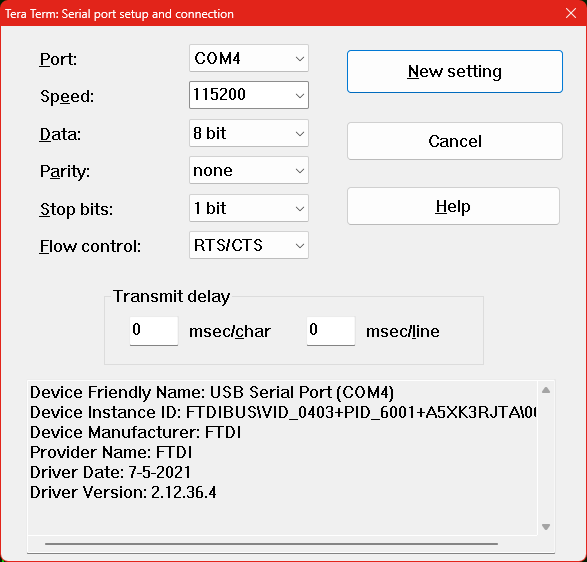
Here we use Tera Term as our terminal software. First ensure the serial port is set to 115200 baud, 8 data bits, 1 stop bit, no parity and has RTS/CTS hardware flow control enabled.
The terminal emulation mode should be set to match the needs of the software you wish to run. In the case of simple text adventure games, for example, pretty much any terminal emulation will do as the games usually only use plain text output.
Below is a terminal session where we copy the Hitchhiker’s Guide to the Galaxy game from a PC to the RomWBW system’s RAM disk (A:) and the run the game.
The system boots up and starts CP/M something like this:
RomWBW HBIOS v3.4.0, 2023-12-31

RCBus [RCZ80_std] Z80 @ 7.372MHz
0 MEM W/S, 1 I/O W/S, INT MODE 1, Z2 MMU
512KB ROM, 512KB RAM
ROM VERIFY: 00 00 00 00 PASS

CTC: IO=0x88 NOT PRESENT
SIO0: IO=0x80 SIO MODE=115200,8,N,1
SIO1: IO=0x82 SIO MODE=115200,8,N,1
DSRTC: MODE=STD IO=0xC0 NOT PRESENT
MD: UNITS=2 ROMDISK=384KB RAMDISK=352KB
FD: MODE=RCWDC IO=0x50 NOT PRESENT
IDE: IO=0x10 MODE=RC
IDE0: NO MEDIA
IDE1: NO MEDIA
PPIDE: IO=0x20 PPI NOT PRESENT
CH0: IO=0x3E NOT PRESENT
CH1: IO=0x3C NOT PRESENT
FP: IO=0x00 NOT PRESENT

Unit        Device      Type              Capacity/Mode
----------  ----------  ----------------  --------------------
Char 0      SIO0:       RS-232            115200,8,N,1
Char 1      SIO1:       RS-232            115200,8,N,1
Disk 0      MD0:        RAM Disk          352KB,LBA
Disk 1      MD1:        ROM Disk          384KB,LBA
Disk 2      IDE0:       Hard Disk         --
Disk 3      IDE1:       Hard Disk         --


RCBus [RCZ80_std] Boot Loader

Boot [H=Help]: c

Loading CP/M 2.2...

CBIOS v3.4.0 [WBW]

Configuring Drives...

        A:=MD0:0
        B:=MD1:0

        3695 Disk Buffer Bytes Free

CP/M-80 v2.2, 54.0K TPA

B>
Next we issue the XM command to transfer the file HITCH.COM from the PC to the RAM disk.
B>xm r a:hitch.com

XMODEM v12.5 - 07/13/86
RomWBW, 30-May-2020 [WBW], HBIOS FastPath on COM0

Receiving: A0:HITCH.COM
344k available for uploads
File open - ready to receive
To cancel: Ctrl-X, pause, Ctrl-X
The Z80 system is now waiting for the file HITCH.COM
From Tera Term, select File, Transfer, XMODEM, Send…
Locate and select the file HITCH.COM
This should give a progress bar something like this:
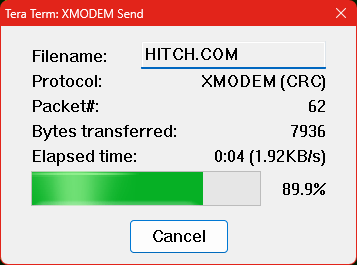
The terminal session for this file transfer should look something like this:
B>xm r a:hitch.com

XMODEM v12.5 - 07/13/86
RomWBW, 30-May-2020 [WBW], HBIOS FastPath on COM0

Receiving: A0:HITCH.COM
344k available for uploads
File open - ready to receive
To cancel: Ctrl-X, pause, Ctrl-X

Thanks for the upload

B>
Repeat this for any additional files. In this case HITCHHIK.DAT
You can now check the files are on A: and run the game:
B>a:
A>dir
A: HITCH    COM : HITCHHIK DAT
A>hitch

7 THE HITCHHIKER'S GUIDE TO THE GALAXY
Infocom interactive fiction - a science fiction story
Copyright (c) 1984 by Infocom, Inc. All rights reserved.
Release 59 / Serial number 851108

You wake up. The room is spinning very gently round your head. Or at least it
would be if you could see it which you can't.

It is pitch black.

   Bedroom                                                       Score: 0/0      >examine bed
It's too dark to see!

   Bedroom                                                       Score: 0/1      >
 Small Computer Central